If you run a pizzeria, you already know that a generic cash register can’t keep up with your menu. A pizza POS system in Canada has to handle half-and-half toppings, three crust types, phone orders during the Friday rush, your own delivery drivers, and Interac debit at the door — all at once, without slowing the line.
This guide covers what actually matters when choosing a POS for a Canadian pizza shop: the features that earn their keep, the ones you can skip, what it should cost, and how to switch without chaos.
Key takeaways
- Pizza menus are the hardest test of any POS — judge a system by its modifiers, not its marketing.
- Phone orders are still 40–60% of volume for many pizzerias; an AI order-taking assistant means none of them go to voicemail.
- In Canada, integrated Global Payments or Moneris terminals eliminate double-entry errors at the counter and at the door.
- Commission-free online ordering with a QR menu keeps your margins away from third-party apps.
- Expect to pay $30–$50/month for modern cloud software on hardware you already own — not $150+ on leased proprietary gear.
Why pizza shops break normal POS systems
Most point-of-sale software is designed around a simple idea: one product, one price, one tap. Pizza doesn’t work that way. A single large pizza order might involve a size, a crust, a sauce choice, six toppings split across two halves, an extra-cheese upcharge, and a “well done” instruction for the kitchen.
If your POS makes that a 45-second conversation with the screen, you lose the rush. If it prints an ambiguous ticket, the kitchen remakes pizzas and your food cost creeps up. The single most important test when evaluating any pizza POS: build your most complicated pizza in under 15 seconds. If you can’t, move on.
The pizza POS checklist
Here’s what a pizzeria genuinely needs, and what each feature is for:
| Feature | Why it matters for pizza |
|---|---|
| Modifier groups with upcharges | Sizes, crusts, sauces, toppings — with automatic pricing for extras |
| Kitchen tickets (KOT) & kitchen display | Clear, instant tickets; no handwriting, no lost orders |
| Phone & AI order taking | Friday night calls answered even when every human is busy |
| Commission-free online ordering & QR menu | Direct orders without giving 20–30% to apps |
| Delivery management | Track your own drivers’ orders from accepted to delivered |
| Integrated Canadian payments | Global Payments / Moneris terminals; Interac, tap, credit |
| Split bills | Even, percentage, or item-wise — game night sorted |
| Floor plan & tables | For slice shops and dine-in sections |
| Loyalty points | Turn Friday customers into every-Friday customers |
| Daily sales & food-cost reports | Know your numbers before your accountant does |
SeroPOS ships every row of that table in one subscription — see the full restaurant feature set for details.
Modifiers: the make-or-break feature
Modifier groups are where pizza POS systems earn their money. In SeroPOS you build guided groups — Choice of Cheese, Choice of Meat, Sauces, Toppings — each option with its own upcharge, so “extra chicken +$1.00” prices itself and staff never do mental math at the counter.
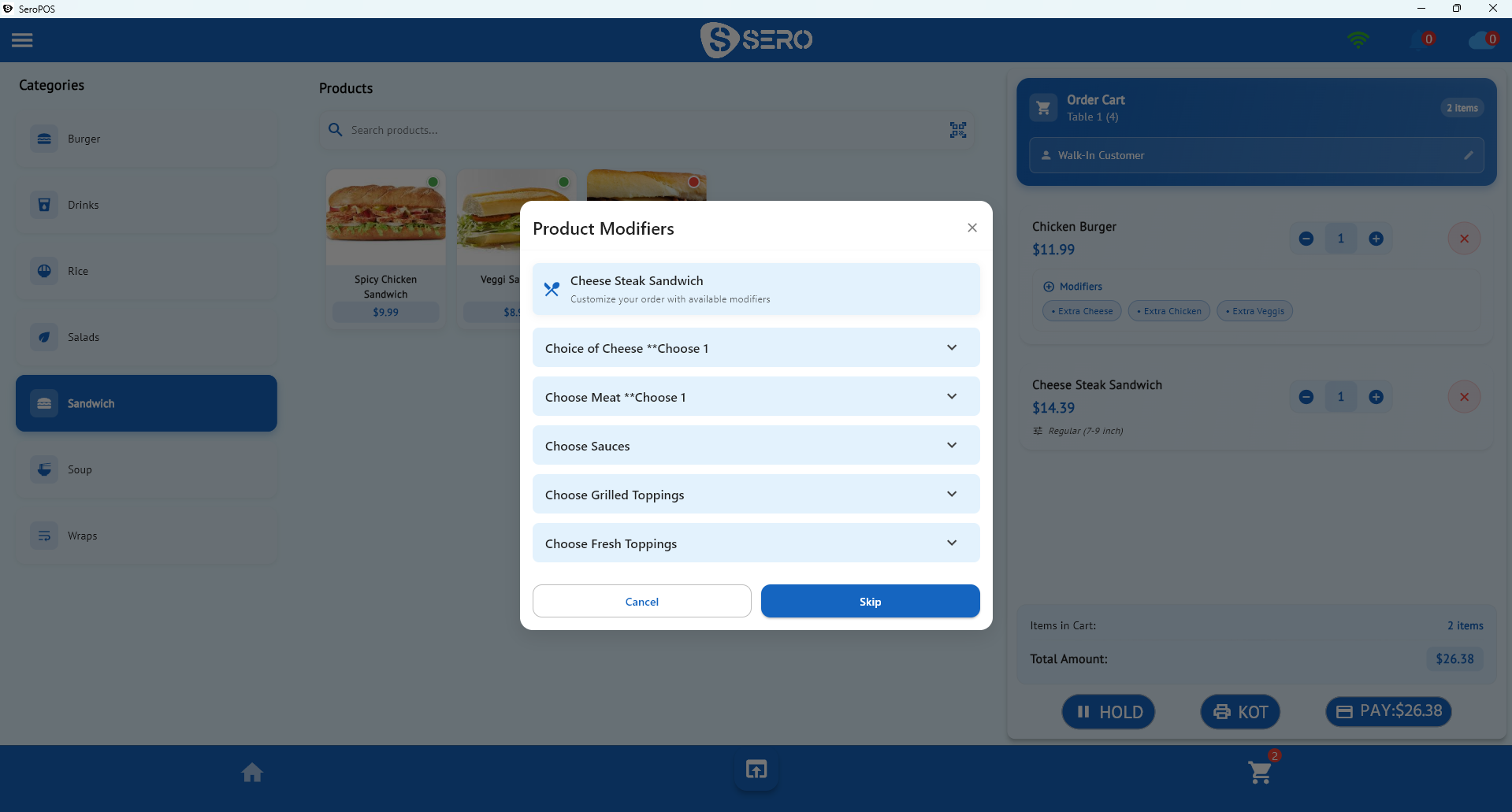
For half-and-half builds, the same mechanism applies: create Left Half and Right Half topping groups and every split pizza rings up unambiguously — and prints unambiguously in the kitchen. Special instructions (“make it less spicy”, “well done”) ride along on the item and appear on the kitchen ticket, not on a sticky note.
Phone orders: stop losing calls to voicemail
Ask any pizzeria owner what Friday at 6 PM sounds like: the phone ringing while every staff member has flour on their hands. Every missed call is a $30–$60 order that just went to the chain down the street.
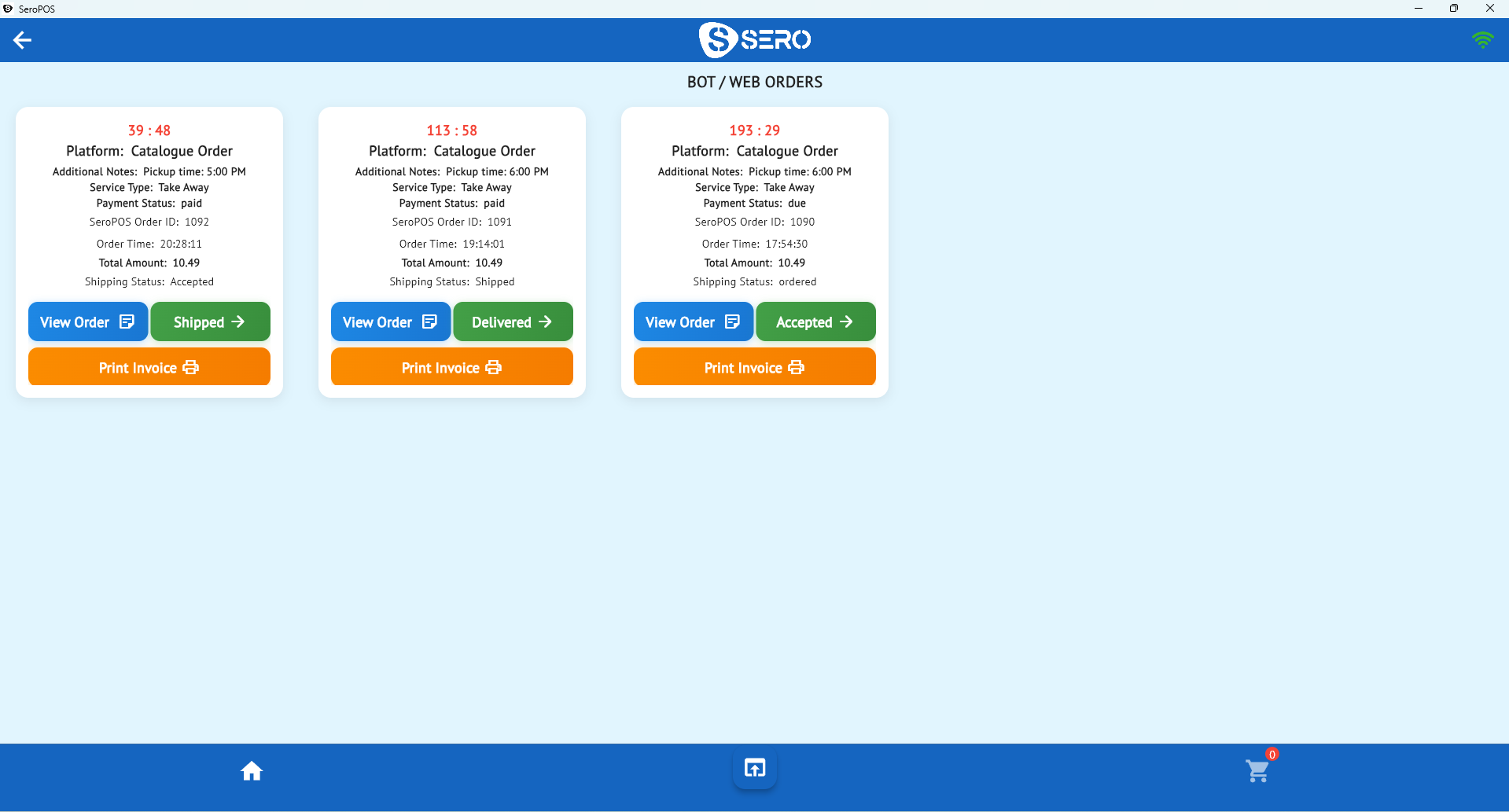
This is the most compelling reason to look at SeroPOS for a pizza shop specifically: it integrates with Inputly, an AI order-taking assistant. Inputly answers the call, talks to your customer naturally, takes the full order — modifiers included — and drops it straight into your SeroPOS order queue alongside your online and QR orders. Your team sees it, fires it to the kitchen, and nobody ever put the customer on hold.
Online ordering without the 20–30% commission
Third-party delivery apps have their place for discovery, but handing over a fifth to a third of every order is not a business model — it’s a subscription to shrinking margins. A modern pizza POS should give you your own ordering channel:
- QR code menu — customers at the counter or table scan, browse, customize, and pay from their phone.
- Embeddable online menu — the same catalogue with cart and checkout, linked from your website, Google Business Profile, and Instagram bio.
- One order queue — web, QR, and AI phone orders all land next to walk-ins, with accept/fulfill controls and automatic kitchen tickets.
Because the menu comes from the same catalogue as your register, a price change or a sold-out topping updates everywhere at once.
Delivery with your own drivers
If you run your own delivery, your POS should track it: orders marked for delivery carry the customer’s address and phone, move through accepted → shipped → delivered states, and settle with the right payment status (paid online vs. due on delivery). SeroPOS handles the full lifecycle so the driver leaves with a clear ticket and returns with a closed order.
Taking payments in Canada
For Canadian pizzerias, payments deserve specific attention:
- Integrated terminals: SeroPOS integrates with Global Payments and Moneris — the totals go from the register to the terminal automatically, so nobody fat-fingers $63.99 as $6.39 during the rush, and batch settlement matches your sales report.
- Interac, tap, credit, Apple Pay, Google Pay all ride on those rails.
- Online payments for web and QR orders run through Stripe with PCI compliance handled.
- Split bills — even, percentage, item-wise, or custom — with mixed tender (half cash, half card) on one order.
Integrated processing is also where errors disappear: end-of-night reconciliation compares one report to one batch, not a stack of paper slips to a memory.
What a pizza POS should cost in 2026
| Legacy pizza POS | Typical cloud POS | SeroPOS | |
|---|---|---|---|
| Software | Often $150–$300+/mo | $69–$165/mo + add-on modules | $30–$50/mo |
| Hardware | Proprietary, leased | Vendor tablets & stands | Devices you already own |
| Contract | Multi-year | Monthly | Monthly, cancel anytime |
| Trial | Demo call | Varies | 14 days free, no card |
The pricing page has the exact plan breakdown — Standard at $30/month covers unlimited products and invoices, multiple users, and chain store management; Pro at $50/month adds QuickBooks & Xero sync, advanced reporting, and recipe management (which is how you finally track dough and cheese costs properly).
Switching without chaos
The good news: moving a pizza shop to a modern POS is a weekend project, not a renovation.
- Download SeroPOS from the App Store, Google Play, Microsoft Store, or Mac App Store.
- Build the menu — categories, sizes, and modifier groups. Import products from Excel if you have a list.
- Connect your printer — standard ESC/POS receipt and kitchen printers are auto-detected over USB or network.
- Run both systems for one quiet shift — lunch on a Tuesday, not dinner on a Friday.
- Go live — and subscribe in-app once the 14-day trial convinces you.
There’s a guided Getting Started flow plus a built-in knowledge base on every admin screen, so your team can answer their own questions mid-shift. Take the product tour to see every screen before you install anything.
The bottom line
A pizza shop doesn’t need the most famous POS — it needs the one that’s fastest at pizza: modifiers that keep up with your menu, a phone that answers itself, ordering channels you own, and Canadian payment terminals that talk to the register. SeroPOS was built for exactly that, at a price ($30–$50/month) that doesn’t eat the margin you’re trying to protect.
Download SeroPOS and take your first order today — 14-day free trial, no credit card, no sales call.